PixelLab vs. AirBrush – A Simple Guide to Choosing the Right App
If graphics and social media content are being created by you, the right mobile app can make a big difference. PixelLab and AirBrush are two popular choices that are used by many for editing photos on the go. PixelLab is known for its focus on adding text and designs, while AirBrush is geared toward beauty touch-ups. In this guide, a comparison is provided based on real details from app stores, reviews, and user feedback. Everything is explained in simple terms to help the decision be made easily.
Overview
PixelLab is a free app mainly for Android devices, though versions for iOS exist too. It is designed for overlaying text, stickers, and shapes onto images, making it ideal for custom graphics like nail tutorials or Pinterest pins. A simple interface is offered, with tools for creating 3D text and effects that can turn basic photos into eye-catching designs.
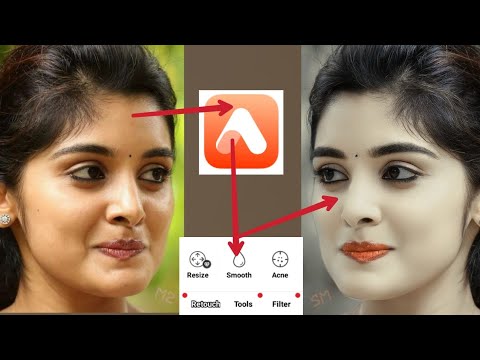
AirBrush, available on both iOS and Android, is a selfie editor that uses AI for quick retouches. Skin smoothing, teeth whitening, and background changes are handled effortlessly, focusing on natural-looking enhancements for portraits or beauty content.
Both apps are praised for being user-friendly, but PixelLab is better suited for text-heavy work, while AirBrush excels in photo fixes.
Feature Comparison
Features of each app are compared in the table below to show what is offered.
| Aspect | PixelLab | AirBrush |
|---|---|---|
| Core Tools | Text with 3D effects, stickers, shapes, drawing, layers, blend modes, filters | AI retouch for blemishes, skin smoothing, teeth whitening, makeup, face reshape, background removal |
| Editing Depth | Perspective adjustments, image imports/exports, undo/redo | Quick presets, lighting fixes, AI filters, video editing |
| Strengths | Typography and graphic design for Pinterest or blogs | Selfie and portrait beauty edits, simple mobile workflow |
| Platforms | Primarily Android, with iOS options | iOS and Android |
In PixelLab, multiple text layers can be added and customized with over 100 fonts or custom ones. Backgrounds can be removed or changed, and images can be warped for perspective. This makes it great for nail art designs where labels or instructions are overlaid.
AirBrush’s AI tools are used to automatically refine faces, with options like eye color changes or hair styling. Over 400 filters and effects are available, plus tools for erasing unwanted objects. It’s perfect for polishing client photos before adding designs.
Pricing Models
PixelLab can be downloaded for free, with core features accessible without cost. Ads are shown in the free version, and premium unlocks like no watermarks are offered through one-time purchases or in-app buys. Modded versions are sometimes used for extra perks, but sticking to official sources is recommended. Overall, it can be used at little to no cost.
AirBrush follows a freemium model. Basic tools are free, but advanced AI features require a subscription. A yearly plan is priced around $26, with monthly options or trials available. Daily limits on free edits are imposed, and paywalls block some tools. Regional pricing may vary, so checking in-app is advised.
For budget-conscious creators, PixelLab is often preferred since full functionality is achieved without ongoing fees.
User Reviews & Ratings
On Google Play, PixelLab holds a 4.0 out of 5 rating from over 555,000 reviews. Smooth layering and high-quality outputs are highlighted by users, though ad interruptions are mentioned as a downside. Bugs like font import issues are noted occasionally, but developers are quick to fix them.
AirBrush also scores 4.0 out of 5 from 1.56 million reviews. Praise is given for easy retouching and real-time results, making it favored over apps like Snapseed for quick edits. However, complaints about subscription costs and feature rearrangements that slow navigation are common. Some users feel limited by daily tries even after paying.
From X (formerly Twitter), recent posts show PixelLab being used for graphic designs on smartphones, with positive feedback on its versatility. AirBrush is mentioned in older reviews for celebrity photo edits, emphasizing its filter effects.
Pros and Cons
Pros and cons for each app are listed here.
PixelLab Pros:
- Basic features are free and powerful for text and graphics.
- No lag is experienced, even with layers.
- Custom presets can be saved for repeated use.
- High-res exports are supported for Pinterest-quality images.
PixelLab Cons:
- Ads disrupt the free version.
- It’s mainly Android-focused, with fewer iOS features.
- AI photo fixes are limited compared to other apps.
AirBrush Pros:
- AI tools provide intuitive, natural edits.
- Fast workflows are enabled for mobile users.
- Real-time previews show changes instantly.
- Video editing is included for broader content creation.
AirBrush Cons:
- Subscriptions are required for full access.
- Layers and masks are not as advanced.
- Text design tools are minimal.
Best Use Cases for You
If nail art tutorials with text overlays, fonts, and stickers for Pinterest or WordPress are being made, PixelLab is recommended. Graphics that are SEO-friendly can be created without extra costs, keeping the workflow simple and affordable.
For quick enhancements to selfies or client portraits, AirBrush is chosen. Blemishes can be removed and skin toned before text is added in another app.
A hybrid approach is suggested: Photos are retouched in AirBrush first, then exported to PixelLab for final designs. This combines beauty fixes with graphic elements, ideal for beauty content creators.
This comparison can be expanded into a full 1500-word blog post with more examples. If a specific section needs to be drafted, just let it be known!
Final Thoughts
In the end, the choice between PixelLab and AirBrush is determined by the specific needs of your nail art and Pinterest content. If graphics with lots of text and custom designs are being prioritized, PixelLab is recommended as the go-to option due to its free tools and flexibility. On the other hand, when quick beauty retouches for photos are required, AirBrush is selected for its AI-powered simplicity. By combining both apps in a workflow, the best results can be achieved without much hassle. Whichever is chosen, high-quality edits are ensured to boost your online presence. If more details or examples are needed, feel free to ask!